
TIDAL Music: HiFi sound
TIDALMusic & Audio
4.460.55K Reviews
- Version
- Varies With Device
- Installs
- 10.00M
- Age Rating
- Teen
Screenshots
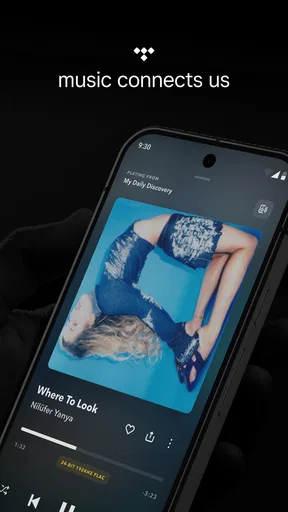
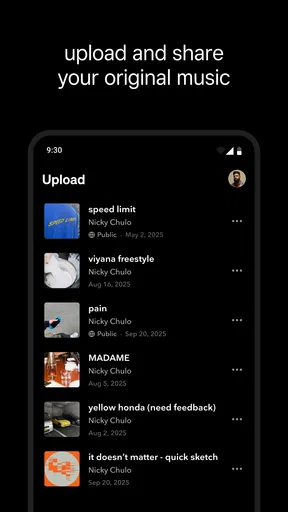

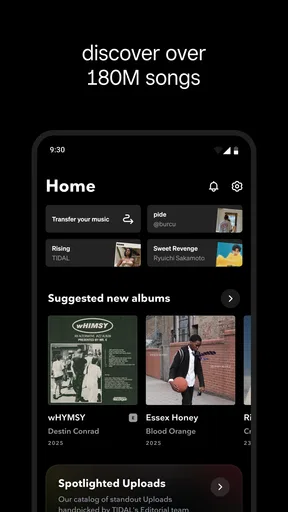
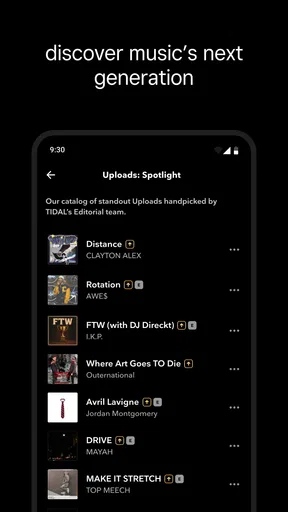
Our Review of TIDAL Music: HiFi sound
 Analysis by Appyee
I treat a music app as more than a place to press play: it becomes part of a daily routine, and it asks me to trust it with listening choices and account details. TIDAL Music: HiFi sound is a music and audio app from TIDAL, available free to install, with in-app purchases ranging from $0.99 to $35.50 per item. Its Teen content rating is worth keeping in mind for families, while its 4.1 average rating from around 356,000 ratings and more than 10 million installs suggest that it has found a substantial audience. Those figures tell me about reach, not whether it will suit my habits, so I would judge it by the listening experience and the choices I can see and manage while using it.
Finding a comfortable way to listen
My first practical question with any streaming service is whether I can find something I want without turning a short break into a browsing session. TIDAL’s Explore area gives me a place to start when I have no specific track in mind, while search is the more direct route when I already know the artist or song. That distinction matters: recommendations are useful for discovery, but they should not get in the way when I simply want to replay a familiar album.
For a realistic weekday routine, I might choose a playlist before leaving home, then let it run during a walk or while doing chores. If I have time to browse, I can use the app to move from an artist I already like toward related listening. If I am in a hurry, I would stick to a saved or familiar choice rather than relying on a recommendation to match a very specific mood. That small habit keeps the app useful without making every listening session feel like a search for the perfect soundtrack.
The app has been available since October 28, 2014, and TIDAL has accumulated around 60,000 written reviews. I see those numbers as useful context, not a guarantee that every listener will value the same things. People who spend time listening closely, own headphones that reveal differences between recordings, or regularly explore full albums may get more from its sound-focused identity than someone who mainly wants background music on a phone speaker.
What sound quality changes in everyday use
The word “HiFi” can sound like a promise that every track will transform your setup. I would approach it more practically: higher-quality playback is most noticeable when the recording, headphones or speakers, and listening environment let you hear the difference. On a noisy commute, the surroundings may matter more than subtle detail. In a quiet room with good headphones, I am more likely to notice separation between instruments or small elements in a recording.
That makes listening equipment part of the decision. If I usually play music through a small speaker while cooking, I would not choose a service on sound quality alone. If I have wired headphones or a capable home setup and enjoy comparing recordings, TIDAL’s emphasis is easier to appreciate. I would also keep my expectations tied to the particular track and playback situation rather than assuming that every song will sound dramatically different.
Another useful habit is to compare the same passage rather than switching between unrelated songs. I would choose a familiar track, listen to a short section, and pay attention to vocals, bass, and quieter background details. This makes it easier to tell whether the sound difference matters to me, instead of confusing a change in song or mood with a change in audio quality. It is a simple test that can help decide whether a sound-focused service fits the way I actually listen.
Discovery without handing over the whole session
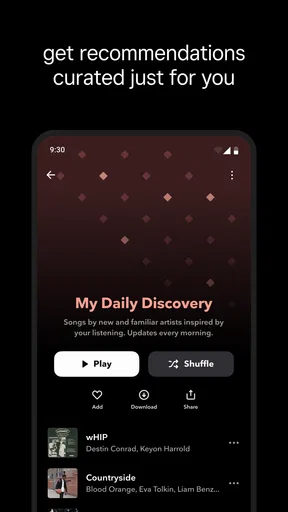
Recommendations can save time, but I do not want them to become the only path through a music library. The app’s discovery features are most helpful when I treat them as suggestions rather than instructions: I can sample a new artist, keep what works, and return to my own choices when the picks miss the mark. A recommendation that is close but not quite right can still be useful if it leads me to a genre, album, or performer I would not have searched for directly.
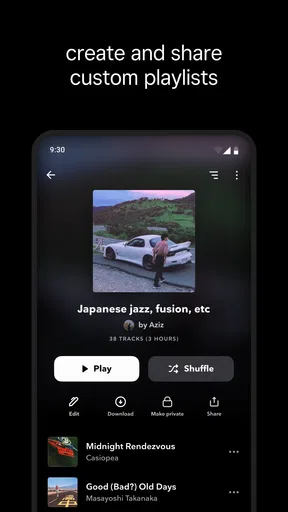
Playlists offer another way to shape a session. I would make separate lists for distinct situations—one for a focused work block, one for a walk, and one for relaxed listening—rather than forcing every favorite into a single long queue. That makes returning to music less dependent on the app guessing my mood. Sharing a playlist can also turn music discovery into a conversation with friends, though I would make sure the list reflects what I actually want to share before sending it around.
There is a trade-off here: personalization is convenient, but suggestions can feel less useful if my listening changes from day to day or if I use one account for very different moods. When I want something specific, searching for the artist or album is more reliable than waiting for a recommendation. When I want to explore, I can give the discovery section a chance and keep control by choosing what to play next.
Content, devices, and practical boundaries
Beyond audio, TIDAL includes music videos, live performance footage, and behind-the-scenes material. I see that as a worthwhile extra for someone who likes to watch performances as well as listen to tracks. It can make a familiar artist feel more present, especially when I have time to sit and watch. It is less important if I use a music app only while commuting or want an interface devoted to audio with as few distractions as possible.
The app can be used on a phone or tablet, and the original experience describes moving between devices as straightforward. In my own routine, I would still plan the handoff around what I am doing: start a playlist on one device, then check that playback is where I expect before settling in elsewhere. This is a small but practical point for anyone who moves between personal listening and a shared room, where the device playing music can affect who controls the session.
Offline listening is part of TIDAL’s stated appeal, and it can be especially useful when I expect an unreliable connection. I would prepare the music I want before leaving a dependable network rather than waiting until I am already on the train or out walking. That workflow also helps avoid the frustration of discovering that the album I planned to hear is not ready when I need it. I would check the app’s current playback and download options directly before building a routine around them, since available controls can depend on the account and app setup.
Trust, account choices, and moments to pause
Because a music service is tied to an account and personal listening, I pay attention to visible choices rather than guessing about behind-the-scenes practices. I would review the account and privacy controls presented in the app, check what options are available for managing the account, and make a deliberate choice about any optional prompts. I do not treat a polished interface or a large user base as proof of how a company handles data; the useful standard is whether the choices I need are clear when I use the service.
There are a few moments when I would slow down before tapping through: signing in on a device I do not own, responding to an account prompt, or deciding whether to share a playlist. In each case, I would read the screen and choose only what makes sense for that situation. If I am using a shared tablet, I would be particularly careful about leaving an account open. These are ordinary safeguards, but they matter more than broad assurances that do not explain what I can actually control.
The free installation makes it easy to try the app, but the presence of in-app purchases means I would check the purchase screen and account settings before committing to any paid option. The listed purchase range runs from $0.99 to $35.50 per item, so I would not assume that every feature or listening arrangement is included just because the app itself costs nothing to download. If I am comparing services, I would look at the plan details shown to me and consider how much I value sound quality, video content, and discovery before spending.
Who is likely to enjoy it—and who may prefer another service
I would recommend giving TIDAL a serious look if listening is an activity in its own right for you: you enjoy albums, notice production details, use decent headphones or speakers, and like having performance videos alongside music. It can also suit someone who wants discovery tools but still prefers to build personal playlists and choose tracks directly. In those cases, the sound-focused approach gives the app a clear reason to sit beside the more familiar streaming options.
On the other hand, I would not choose it solely because “higher quality” sounds impressive. If most of your listening happens through a basic phone speaker in a busy place, if you rarely notice audio differences, or if your main priority is the simplest possible background playlist, a service you already know may be the more comfortable fit. The same goes for anyone who wants to avoid paid options altogether: check the account and purchase choices first, rather than assuming the free download settles the cost question.
Compared with mainstream music-streaming alternatives, TIDAL’s strongest case is its emphasis on sound and its mix of audio with visual music material. The everyday basics—finding songs, listening to playlists, and exploring artists—are familiar territory across the category, so I would not switch just for those alone. I would compare the actual experience that matters to me: how I feel about the sound on my own equipment, whether I use the extra video content, and whether the available plan suits my listening habits. If another service already gives me a library and recommendations I like, that familiarity has real value too.
First Impressions and Interface
When you first open TIDAL Music, you’re greeted with a sleek and modern design. It feels like stepping into a futuristic music lounge. The app’s user interface is intuitive, with everything neatly organized. I didn’t have to spend much time hunting for features, which is a win in my book!
One of the standout features is the “Explore” section. It’s like having a personal DJ who knows exactly what you’re in the mood for. From curated playlists to artist recommendations, it’s all there, neatly laid out and ready to be discovered.
Sound Quality That Hits Different
Now, let’s talk about the real star of the show: the sound quality. TIDAL Music offers HiFi and Master Quality Authenticated (MQA) sound, which is a game-changer. As soon as I plugged in my headphones and hit play, I was blown away. The richness and depth of the audio are unparalleled. It feels like you’re in the studio right alongside your favorite artists.
For audiophiles, this is pure bliss. You can hear every beat, every note, and every nuance. It’s like upgrading from regular TV to 4K Ultra HD – once you experience it, there’s no going back.
Exclusive Content and Features
Another major perk of TIDAL is its exclusive content. The app boasts a vast collection of music videos, live concert footage, and behind-the-scenes documentaries that you won’t find elsewhere. I stumbled upon some live sessions from my favorite bands that I didn’t even know existed!
Plus, TIDAL’s integration with smart devices is seamless. Whether you’re using a smart speaker, your phone, or a tablet, switching between devices is a breeze. This flexibility makes it easy to keep the music flowing no matter where you are or what you’re doing.
Discovery and Personalization
One thing I love about TIDAL Music is how it learns from my listening habits. The more you listen, the better it gets at suggesting new tracks and artists that match your taste. It’s like having a music-savvy friend who knows exactly what you need to hear next.
Creating and sharing playlists is also super easy. I’ve had a blast putting together my favorite tracks and sharing them with friends. It’s a great way to discover new music through the people you trust the most.
Final Thoughts
So, is TIDAL Music: HiFi sound worth it? If you’re someone who truly values high-quality audio and exclusive content, I’d say absolutely. The app offers a premium experience that stands out in the crowded world of music streaming.
While the subscription might be a bit pricier compared to other services, the superior sound quality and unique content make it a worthwhile investment for music lovers. If you’re ready to take your listening experience to the next level, give TIDAL a try. You might just find it’s exactly what your music-loving soul has been searching for.
Verdict
Strengths of TIDAL Music: HiFi sound
- High-quality audio streaming available.
- Extensive library of songs and albums.
- Exclusive content from popular artists.
- User-friendly interface enhances experience.
- Offline mode for on-the-go listening.
Limitations of TIDAL Music: HiFi sound
- Subscription required for premium features.
- Limited free version with ads.
- Occasional app crashes reported.
- Higher data usage for HiFi quality.
- Not all content available offline.
Similar Picks in This Category
View All
YouTube Music
Google LLC4.4

Samsung Music
Samsung Electronics Co., Ltd.3.8

Spotify: Music and Podcasts
Spotify AB4.3

JioSaavn - Music & Podcasts
Saavn Media Limited4.3

Lark Player:Music Player & MP3
Lark Player Studio - Music, MP3 & Video Player4.6

StarMaker: Sing Karaoke Songs
SKYWORK AI PTE. LTD.4.3
Frequently Asked Questions
What is TIDAL Music and how does it differ from other streaming services?
TIDAL Music is a subscription-based music streaming service known for its high-fidelity sound quality. Unlike many other streaming platforms, TIDAL offers lossless audio, providing listeners with studio-quality sound. It also features exclusive content, including music videos, playlists, and interviews, making it a unique choice for audiophiles and music enthusiasts.
Does TIDAL support offline listening and how can I download music for offline use?
Yes, TIDAL supports offline listening. To download music, simply find the album or playlist you want, then tap the download icon. This feature is available to all subscribers, allowing you to listen to your favorite tracks without an internet connection, perfect for when you're on the go or in areas with limited connectivity.
What are the subscription options available on TIDAL Music?
TIDAL offers multiple subscription tiers to cater to different needs. The main options are TIDAL Premium, which provides standard sound quality, and TIDAL HiFi, which offers lossless, CD-quality audio. There are also family plans, student discounts, and military discounts available, providing flexible options for various user groups.
Is TIDAL Music compatible with smart home devices and wearables?
Yes, TIDAL Music is compatible with a range of smart home devices and wearables. It supports integration with Amazon Alexa, Google Assistant, and Apple HomePod. You can also use TIDAL on devices like smart TVs, gaming consoles, and smartwatches, ensuring a seamless listening experience across different platforms.
How does TIDAL handle music recommendations and curated playlists?
TIDAL uses a combination of algorithmic and human curation to offer personalized music recommendations. The platform features a wide array of curated playlists across various genres, moods, and activities. It also provides users with tailored suggestions based on their listening habits, helping discover new artists and tracks.
